
dou to some sh__ty executors (like delta) having outdated, broken, bad `require()` implementation on Core ModuleScripts its better not to use this anymore if your a scripting looking for a good error prompt
1
No reports yet. Tried it? Be the first to say.
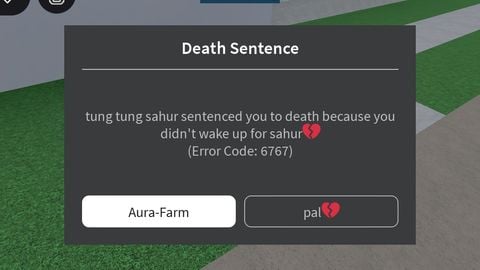
trigger a real error prompt but customizable nothing much it acually uses the same method that roblox uses for there error prompt (but no blur but it still does freeze everything until you press something)
dou to some sh__ty executors (like delta) having outdated, broken, bad `require()` implementation on Core ModuleScripts its better not to use this anymore if your a scripting looking for a good error prompt
local CoreGui = game:GetService("CoreGui").RobloxGui
local Package = CoreGui.Modules

local ErrorPrompt = require(Package.ErrorPrompt)

local myPrompt = ErrorPrompt.new("Default", {
    PlayAnimation = true,
    HideErrorCode = false
})

local Gui = Instance.new("ScreenGui", CoreGui)
Gui.Name = "MainUI"
Gui.IgnoreGuiInset = true

myPrompt:setParent(Gui)
myPrompt:setErrorTitle("Death Sentence")

myPrompt:updateButtons({
    {
        Text = "Aura-Farm",
        LayoutOrder = 1,
        Primary = true,
        Callback = function()
            print("you tuff...")
            myPrompt:onErrorChanged("", nil)
        end
    },
    {
        Text = "pal💔",
        LayoutOrder = 2,
        Primary = false,
        Callback = function()
            print("well fuck you")
            myPrompt:onErrorChanged("", nil)
        end
    }
})

local ErrorCode = { Value = 6767 }
myPrompt:onErrorChanged("tung tung sahur sentenced you to death because you didn't wake up for sahur💔", ErrorCode)


Script hub