937 Views
1.6k Executions
Custom Security Camera Tool (With Weld & Attach)
Universal Script 📌
CortlandscripterFirst script
2 months ago
Reviewed by ThunderModsScriptBlox staffon How review works
Does it work?
No reports yetNo reports yet. Tried it? Be the first to say.
Also noticed:
Description
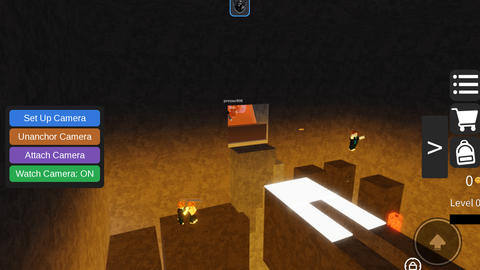
A clean, fully local security camera script. It creates a simple UI that allows you to set up a hidden camera anywhere in the game world, unanchor it, or weld/attach it directly to moving or static base parts. Control everything toggleable via buttons. No external links.
local Players = game:GetService("Players")
local RunService = game:GetService("RunService")

local player = Players.LocalPlayer
local camera = workspace.CurrentCamera
local mouse = player:GetMouse()

local cameraPart = nil
local watching = false
local placingCamera = false
local attachingCamera = false

--// GUI
local gui = Instance.new("ScreenGui")
gui.Name = "CameraGui"
gui.ResetOnSpawn = false
gui.Parent = player:WaitForChild("PlayerGui")

local frame = Instance.new("Frame")
frame.Size = UDim2.new(0, 240, 0, 200)
frame.Position = UDim2.new(0, 20, 0.5, -100)
frame.BackgroundColor3 = Color3.fromRGB(30, 30, 30)
frame.BorderSizePixel = 0
frame.Parent = gui

local corner = Instance.new("UICorner")
corner.CornerRadius = UDim.new(0, 10)
corner.Parent = frame

--// Create button
local function createButton(text, y, color)

	local button = Instance.new("TextButton")

	button.Size = UDim2.new(1, -20, 0, 40)
	button.Position = UDim2.new(0, 10, 0, y)

	button.Text = text
	button.TextColor3 = Color3.new(1, 1, 1)
	button.TextSize = 16
Comments
0Log in to join the conversation. Login
No comments yet. Be the first!