
LETS GOO 10K EXEE. Smal update Is being published
1

Reviewed by QueueSherlockPaid revieweron How review works
No reports yet. Tried it? Be the first to say.
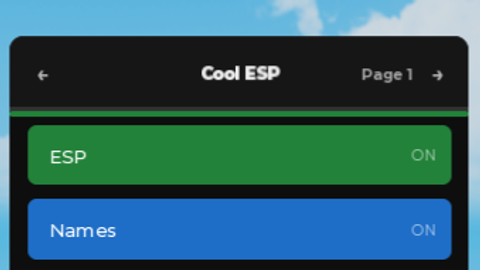
Core ESP (Page 1) Master ESP Switch: A primary toggle used to activate or disable all visual overlay effects within the game. Names Display: A feature that displays target player usernames above their character. Distance Tracker: A tracker feature that displays the exact measured distance (in studs [Xs]) you are from other players. Text Size Adjustment: A feature that cycles through multiple font scaling multipliers to alter overlay text size. Outline Transparency Slide: An adjustment slider that alters the level of transparency of the player highlight outlines. Customizable Hide Key: A feature that lets you bind a custom keyboard key (default: RightShift) to the action of toggling the menu UI visibility. Visuals & Limits (Page 2) Look Direction Tracker: A feature that displays a rotating directional indicator ($\Delta$) on top of players' heads to indicate what direction they are facing. Arrow Size Scaler: A fine-tuning option that alters the physical size scale of the look-direction indicator. Update Refresh Rate: An options menu that lets you select how often the ESP should update its positional information (range: $0.05$s - $1.0$s). Distance Limiter: A distance limiter that prevents targets from appearing in-view if you are further than a certain amount of studs away from them. Proximity & Predate (Page 3) Proximity Alert System: A proximity detection system that displays proximity alerts (in red text) when players enter a proximity alert range. Dynamic Proximity Text Size: A toggleable feature that enables specific font size scaling to be applied if/when a player enters the proximity alert range. Predate Target Lock: A target lock feature that locks the ESP target to only one player (from a list) while ignoring distance limiters and proximity limiters. Spectate & Utilities (Page 4) Proxy Spectate Mode: A spectate mode that smoothly transitions your camera to the target player's character without disrupting your ability to control your character. Live Proximity Counter: A counter that displays how many players are within your proximity alert range at a given time. Customizable Menu Title: A click-interactive option that lets you click the centered title box on the very top of your menu to rename your script interface. Management ToolsPreset Save Slots: Three slots (1, 2, 3) that let you save, apply, or clear custom configurations of your script settings. Built-in Interactive Guide: An interactive guide panel that is built into your UI system that explains how each feature works. (Script has been made by my rage against AR2 anti-cheat.)
Mainly dedicated for
Works in: Apocalypse Rising 2
Script edited
LETS GOO 10K EXEE. Smal update Is being published
update delayed to next monday (studies)
update ready by monday
loadstring(game:HttpGet("https://raw.githubusercontent.com/codeeeeeer666/CoolESP/refs/heads/main/Coolest"))()

Script hub

Script hub
![[🎃] Throw Food For Animals](/images/script/120219252362013-1793546445857.png)

![Martial Arts World [IMMORTAL REALM]](https://tr.rbxcdn.com/180DAY-00d2af0644bd2657f2b0293f5d1f0c3e/480/270/Image/Webp/noFilter)
![[ZENTETSU⚡] Blue Lock: Rivals](/images/script/18668065416-1785422080080.png)


Cool script
@aybat_ataybek yeah fr