30.7k Views
100 Executions
Calculator script
Universal Script 📌
Fanumtax7979Published 5
2 years ago
Please login to perform these actions:Does it work?
No reports yetNo reports yet. Tried it? Be the first to say.
Also noticed:
Description
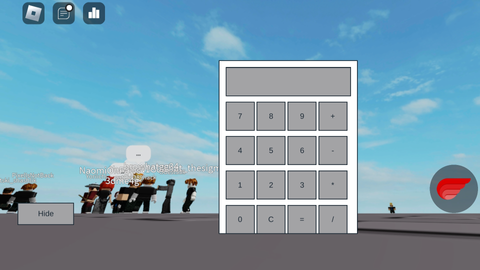
A calculator has a show button and hide button and is moveable
Updates
Script edited: Create script
-- GUI Layout
local screenGui = Instance.new("ScreenGui")
screenGui.Parent = game.Players.LocalPlayer:WaitForChild("PlayerGui")

local frame = Instance.new("Frame")
frame.Size = UDim2.new(0, 200, 0, 250)
frame.Position = UDim2.new(0.5, -100, 0.5, -125)
frame.BackgroundColor3 = Color3.new(1, 1, 1)
frame.Parent = screenGui

local textBox = Instance.new("TextBox")
textBox.Size = UDim2.new(0, 180, 0, 40)
textBox.Position = UDim2.new(0, 10, 0, 10)
textBox.Text = ""
textBox.Parent = frame

local buttonNames = {"7", "8", "9", "+", "4", "5", "6", "-", "1", "2", "3", "*", "0", "C", "=", "/"}

for i, name in ipairs(buttonNames) do
    local button = Instance.new("TextButton")
    button.Size = UDim2.new(0, 40, 0, 40)
    button.Text = name
    button.Parent = frame

    local x = ((i - 1) % 4) * 45 + 10
    local y = math.floor((i - 1) / 4) * 50 + 60
    button.Position = UDim2.new(0, x, 0, y)
end

local hideButton = Instance.new("TextButton")
hideButton.Size = UDim2.new(0, 80, 0, 30)
hideButton.Position = UDim2.new(0, 10, 0, 260)
hideButton.Text = "Hide"
hideButton.Parent = screenGui

local showButton = Instance.new("TextButton")
showButton.Size = UDim2.new(0, 80, 0, 30)
showButton.Position = UDim2.new(0, 100, 0, 260)
showButton.Text = "Show"
showButton.Visible = false



why the hell do i need this
great, i like it
Most useful script ever