388 Views
47 Executions
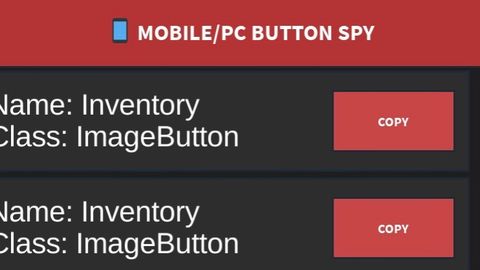
Button detecter Gives you the code of the button
Universal Script 📌
Lebronjameskdhhf10K executions
9 months ago
Please login to perform these actions:Does it work?
No reports yetNo reports yet. Tried it? Be the first to say.
Also noticed:
Description
Works for any game say if it doesn’t have any thing that responds in your spy this will give you the code of the specific button! So you can use it for your script!
local ScreenGui = Instance.new("ScreenGui")
local MainFrame = Instance.new("Frame")
local ScrollingFrame = Instance.new("ScrollingFrame")
local UIListLayout = Instance.new("UIListLayout")
local Title = Instance.new("TextLabel")

-- Setup UI
ScreenGui.Name = "UniversalButtonSpy"
ScreenGui.Parent = game:GetService("CoreGui")
ScreenGui.ResetOnSpawn = false

MainFrame.Name = "MainFrame"
MainFrame.Parent = ScreenGui
MainFrame.BackgroundColor3 = Color3.fromRGB(30, 30, 30)
MainFrame.BorderSizePixel = 0
MainFrame.Position = UDim2.new(0.3, 0, 0.3, 0)
MainFrame.Size = UDim2.new(0, 260, 0, 300)
MainFrame.Active = true
MainFrame.Draggable = true

Title.Parent = MainFrame
Title.Size = UDim2.new(1, 0, 0, 35)
Title.BackgroundColor3 = Color3.fromRGB(180, 50, 50) -- Red theme for mobile spy
Title.Text = "📱 MOBILE/PC BUTTON SPY"
Title.TextColor3 = Color3.fromRGB(255, 255, 255)
Title.TextSize = 14
Title.Font = Enum.Font.SourceSansBold

ScrollingFrame.Parent = MainFrame
ScrollingFrame.Position = UDim2.new(0, 0, 0, 35)
ScrollingFrame.Size = UDim2.new(1, 0, 1, -35)
ScrollingFrame.BackgroundTransparency = 1
ScrollingFrame.CanvasSize = UDim2.new(0, 0, 0, 0)
ScrollingFrame.ScrollBarThickness = 5

UIListLayout.Parent = ScrollingFrame
UIListLayout.SortOrder = Enum.SortOrder.LayoutOrder
UIListLayout.Padding = UDim.new(0, 5)

local function AddButtonToList(obj)






Good