20.0k Views
327 Executions
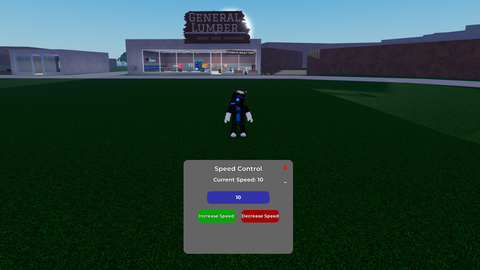
simple speed GUI
Universal Script 📌
oogishPublished 5
2 years ago
Please login to perform these actions:Does it work?
No reports yetNo reports yet. Tried it? Be the first to say.
Also noticed:
Description
A literal speed gui, nothing to it thats it.
-- Variables to define the player and UI setup
local player = game.Players.LocalPlayer
local mouse = player:GetMouse()

-- Utility function for smooth tween animations
local function createTween(object, tweenInfo, goal)
    local tweenService = game:GetService("TweenService")
    local tween = tweenService:Create(object, tweenInfo, goal)
    tween:Play()
    return tween
end

-- Function to create the UI
local function createUI()
    -- Create the ScreenGui
    local screenGui = Instance.new("ScreenGui")
    screenGui.Parent = player:WaitForChild("PlayerGui")
    screenGui.ResetOnSpawn = false  -- Keep UI across respawns

    -- Create the main UI frame with a grey background
    local mainFrame = Instance.new("Frame")
    mainFrame.Size = UDim2.new(0, 350, 0, 300)  -- Reduced size for a more compact UI
    mainFrame.Position = UDim2.new(0.5, -175, 0.8, -150)
    mainFrame.BackgroundColor3 = Color3.fromRGB(100, 100, 100)  -- Grey background
    mainFrame.BorderSizePixel = 0
    mainFrame.Parent = screenGui

    -- Add rounded corners to the frame
    local UICorner = Instance.new("UICorner")
    UICorner.CornerRadius = UDim.new(0, 15)  -- Slightly smaller corner radius
    UICorner.Parent = mainFrame

    -- Fade-in effect for the entire frame
    mainFrame.BackgroundTransparency = 1
    createTween(mainFrame, TweenInfo.new(1, Enum.EasingStyle.Quart, Enum.EasingDirection.Out), {BackgroundTransparency = 0})

    -- Add a title label with a glowing effect
    local titleLabel = Instance.new("TextLabel")
    titleLabel.Size = UDim2.new(1, 0, 0, 35)
    titleLabel.Position = UDim2.new(0, 0, 0, 10)







Its a nice script
yea just a speed script
lil bro disliked my comment
chatgpt!