1.9k Views
3.9k Executions
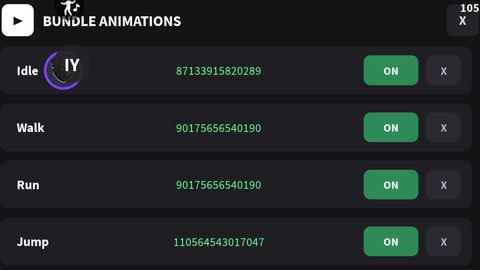
BUNDLE Animation lD
Universal Script 📌
MyntyPaws10K executions
3 months ago
Please login to perform these actions:Does it work?
No reports yetNo reports yet. Tried it? Be the first to say.
Also noticed:
Description
ID Animation
-- Services
local Players = game:GetService("Players")
local UserInputService = game:GetService("UserInputService")

local player = Players.LocalPlayer
local playerGui = player:WaitForChild("PlayerGui")

---------------------------------------------------------
-- 1. MAIN SCREEN GUI & TOGGLE BUTTON
---------------------------------------------------------
local screenGui = Instance.new("ScreenGui")
screenGui.Name = "BundleAnimationsGui"
screenGui.ResetOnSpawn = false
screenGui.Parent = playerGui

local toggleBtn = Instance.new("TextButton")
toggleBtn.Name = "ToggleAnimBtn"
toggleBtn.Size = UDim2.new(0, 130, 0, 36)
toggleBtn.Position = UDim2.new(0, 15, 0, 100)
toggleBtn.BackgroundColor3 = Color3.fromRGB(30, 30, 35)
toggleBtn.Text = "▶ Animations"
toggleBtn.TextColor3 = Color3.fromRGB(255, 255, 255)
toggleBtn.Font = Enum.Font.SourceSansBold
toggleBtn.TextSize = 14
toggleBtn.Parent = screenGui

local toggleCorner = Instance.new("UICorner")
toggleCorner.CornerRadius = UDim.new(0, 8)
toggleCorner.Parent = toggleBtn

---------------------------------------------------------
-- 2. MAIN FRAME (DESAIN DARK THEME)
---------------------------------------------------------
local mainFrame = Instance.new("Frame")
mainFrame.Name = "MainFrame"
mainFrame.Size = UDim2.new(0, 440, 0, 320)
mainFrame.Position = UDim2.new(0.5, -220, 0.5, -160)
mainFrame.BackgroundColor3 = Color3.fromRGB(20, 20, 23)
mainFrame.BorderSizePixel = 0
mainFrame.Active = true
Comments
0Log in to join the conversation. Login
No comments yet. Be the first!