1.8k Views
848 Executions

Does it work?
No reports yetNo reports yet. Tried it? Be the first to say.
Also noticed:
Description
Binggui (How Coolgui)
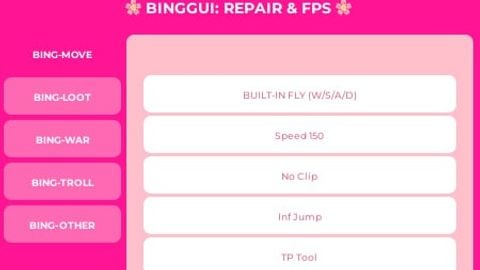
-- BINGGUI V1.6 (ULTIMATE REPAIR + ANTI-LAG)
local P = game.Players.LocalPlayer; local R = game:GetService("RunService"); local UIS = game:GetService("UserInputService")
if game.CoreGui:FindFirstChild("BINGGUI") then game.CoreGui.BINGGUI:Destroy() end

local S = Instance.new("ScreenGui", game.CoreGui); S.Name = "BINGGUI"
local Main = Instance.new("Frame", S); Main.Size = UDim2.new(0, 460, 0, 320); Main.Position = UDim2.new(0.3, 0, 0.3, 0); Main.BackgroundColor3 = Color3.fromRGB(255, 20, 147); Main.Active = true; Main.Draggable = true
Instance.new("UICorner", Main).CornerRadius = UDim.new(0, 15)

-- Header
local Title = Instance.new("TextLabel", Main); Title.Size = UDim2.new(1, 0, 0, 40); Title.Text = "🌸 BINGGUI: REPAIR & FPS 🌸"; Title.TextColor3 = Color3.new(1, 1, 1); Title.BackgroundTransparency = 1; Title.Font = Enum.Font.GothamBold; Title.TextSize = 16

-- Layout
local TabContainer = Instance.new("Frame", Main); TabContainer.Size = UDim2.new(0, 110, 1, -50); TabContainer.Position = UDim2.new(0, 10, 0, 45); TabContainer.BackgroundTransparency = 1
local Content = Instance.new("Frame", Main); Content.Size = UDim2.new(1, -135, 1, -55); Content.Position = UDim2.new(0, 125, 0, 45); Content.BackgroundColor3 = Color3.fromRGB(255, 192, 203); Content.BorderSizePixel = 0
Instance.new("UICorner", Content)

local Tabs = {}
local function CreateTab (name)
    local t = Instance.new("ScrollingFrame", Content); t.Size = UDim2.new(1, 0, 1, 0); t.BackgroundTransparency = 1; t.Visible = false; t.ScrollBarThickness = 0; t.CanvasSize = UDim2.new(0, 0, 2, 0)
    local btn = Instance.new("TextButton", TabContainer); btn.Size = UDim2.new(1, 0, 0, 35); btn.Position = UDim2.new(0, 0, 0, #Tabs * 40); btn.Text = name; btn.BackgroundColor3 = Color3.fromRGB(255, 105, 180); btn.TextColor3 = Color3.new(1, 1, 1); btn.Font = Enum.Font.GothamBold; btn.TextSize = 10
    Instance.new("UICorner", btn)
    btn.MouseButton1Click:Connect(function()
        for _, v in pairs(Tabs) do v.Frame.Visible = false; v.Btn.BackgroundColor3 = Color3.fromRGB(255, 105, 180) end
        t.Visible = true; btn.BackgroundColor3 = Color3.fromRGB(255, 20, 147)
    end)
    table.insert(Tabs, {Frame = t, Btn = btn})
    return t
end

local function AddFunc(tab, text, cb)
    local b = Instance.new("TextButton", tab); b.Size = UDim2.new(0.9, 0, 0, 35); b.Position = UDim2.new(0.05, 0, 0, #tab:GetChildren() * 38); b.Text = text; b.BackgroundColor3 = Color3.fromRGB(255, 255, 255); b.TextColor3 = Color3.fromRGB(219, 112, 147); b.Font = Enum.Font.GothamMedium; b.TextSize = 10
    Instance.new("UICorner", b); b.MouseButton1Click:Connect(cb)
end

-- --- СИСТЕМА ПОЛЕТА (BUILT-IN) ---
local flying = false; local speed = 50; local bv, bg
local function toggleFly()
    flying = not flying; local char = P.Character; if not char then return end
    if flying then
        bv = Instance.new("BodyVelocity", char.HumanoidRootPart); bv.MaxForce = Vector3.new(math.huge, math.huge, math.huge); bv.Velocity = Vector3.new(0,0,0)
Comments
0Log in to join the conversation. Login
No comments yet. Be the first!