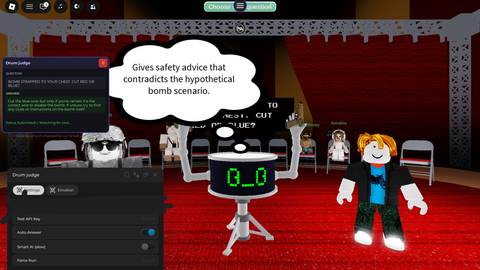
Answer with ai updated by GLM AI
Script hub
Does it work?
No reports yetNo reports yet. Tried it? Be the first to say.
Description
Groq API Integration: Answers questions using Llama-3.3-70B or Llama3-70B-8192. Automatic Question Watching: Detects changes in workspace.Question and auto-submits. Emotion System: Switches between Funny, Serious, and Aggressive personas, with auto-detection for real-world emergencies. Game Access Gate: Verifies player team and specific map coordinates before answering, supporting multiple Place IDs. Custom Rayfield UI: Draggable interface with API key input, testing, auto-answer toggle, and manual force run. Response Cleaning: Strips markdown, quotes, and filler words like "obviously" before submitting. Automated Submission: Uses executor functions (firesignal, etc.) to auto-fill and click the submit button. Strict Prompting: Enforces logical, clear answers without unnecessary exclamations or over-explaining. Not 100% perfect but made to be the best in the game. Also very fast,, found an AI now.
Supported games 1

AI Judge
All scriptsadded AI improvements and emotions
Works in: AI Judge
-- miau
-- workspace.Question is a StringValue

local Rayfield = loadstring(game:HttpGet('https://sirius.menu/rayfield'))()

local HttpService = game:GetService("HttpService")
local Players = game:GetService("Players")
local Teams = game:GetService("Teams")
local LocalPlayer = Players.LocalPlayer
local PlayerGui = LocalPlayer:WaitForChild("PlayerGui")

local GROQ_URL = "https://api.groq.com/openai/v1/chat/completions"

local GROQ_API_KEY = ""
local lastQuestion = ""
local isRunning = false
local autoEnabled = true
local useSmartAI = false

-- Emotion States
local autoEmotionEnabled = true
local selectedEmotion = "Funny"

-- Cache judgment GUI references once
local judgmentInput = PlayerGui:WaitForChild("JudgmentInput", 10)
local answerInput, submitButton
if judgmentInput then
    local mainFrame = judgmentInput:WaitForChild("MainFrame", 10)
    if mainFrame then
        answerInput = mainFrame:WaitForChild("AnswerInput", 10)
        submitButton = mainFrame:WaitForChild("SubmitButton", 10)
    end
end

-- =====================
-- BUILD GUI
-- =====================

local ScreenGui = Instance.new("ScreenGui")
ScreenGui.Name = "GroqAnswerGui"







Yo API key broken
new update: changed smart AI, better accuracy, less bugs
the script will be updated
cant get an api key
@4457885f97444r you gotta go to groq api keb and sign up and make a forever api key
Smart AI (slow) wont work
Delta works
probably but rayfield is little hard for mobile