2.8k Views
47 Executions
Anka UI Library Best UI To Use For Your Scripts
Universal Script 📌
CatBoyPublished 50
1 year ago
Please login to perform these actions:Does it work?
No reports yetNo reports yet. Tried it? Be the first to say.
Also noticed:
Description
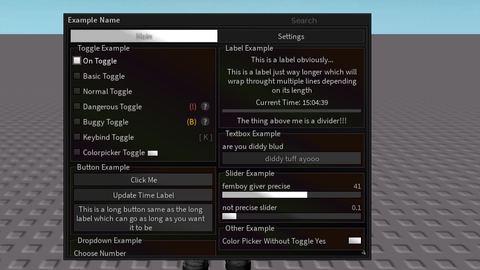
Anka is a rewrite of an older UI made by Bracket. This version has everything you need and is fully open source. You can modify the code or fork it if you’d like. Check it out here: https://raw.githubusercontent.com/nfpw/XXSCRIPT/refs/heads/main/Library/Module.lua Report any issues to @nfpw on discord!
-- gui remake by @! nfpw on discord
-- custom gui settings you can also remove this if you dont want it
local stored_fonts = {}
gui_config = {
    Color = Color3.fromRGB(255, 255, 255),
    Keybind = Enum.KeyCode.Insert, -- for pc related only enum keys documentation: https://create.roblox.com/docs/reference/engine/enums/KeyCode
    Assets = false, -- set to true if you want custom background asset
    MinHeight = 100,
    MaxHeight = 600,
    InitialHeight = 400,
    MinWidth = 300,
    MaxWidth = 800,
    InitialWidth = 500
}

for _, v in Enum.Font:GetEnumItems() do
    table.insert(stored_fonts, v.Name)
end

local config = (getfenv().gui_config) or nil -- custom config or fully ignore this
local library = loadstring(game:HttpGet("https://raw.githubusercontent.com/nfpw/XXSCRIPT/refs/heads/main/Library/Module.lua"))()
local window = library:CreateWindow(config, gethui())
local window_name = library:SetWindowName("Example Name") -- title to use for gui

-- create/add tabs here
local tabs = {
    -- creates "main" tab
    main = window:CreateTab("Main"),
    settings = window:CreateTab("Settings")
}

-- create/add sections here if you dont put left or right as the 2nd argument it will auto generate based on size
local sections = {
    toggle_example_section = tabs.main:CreateSection("Toggle Example"),
    label_example_section = tabs.main:CreateSection("Label Example"),
    button_example_section = tabs.main:CreateSection("Button Example"),
    textbox_example_section = tabs.main:CreateSection("Textbox Example"),
    dropdown_example_section = tabs.main:CreateSection("Dropdown Example"),
    slider_example_section = tabs.main:CreateSection("Slider Example"),
    other_example_section = tabs.main:CreateSection("Other Example", "right")





Goated except for the fact that the colorpicker can't be hidden once opened lol