532 Views
924 Executions
one second one year script (keyless)
One Second = One Year
2 months ago
Reviewed by QueueHeroPaid revieweron How review works
one second one year script (keyless) is an One Second = One Year script for Roblox, uploaded to ScriptBlox on Sep 5, 2026. Reviewed by a person on Sep 7, 2026.
Does it work?
No reports yetNo reports yet. Tried it? Be the first to say.
Also noticed:
Description
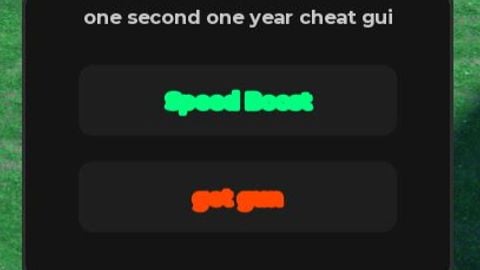
1. speed boost (allows you to faster than anyone, makes it easier to punch people if they keep running away) 2. get gun (gives you a gun)
-- Universal Draggable Executor GUI (Speed Boost & Get Gun)
local Players = game:GetService("Players")
local UserInputService = game:GetService("UserInputService")
local RunService = game:GetService("RunService")

local localPlayer = Players.LocalPlayer
local PlayerGui = localPlayer:WaitForChild("PlayerGui")

-- Destroy existing GUI if it's already running to avoid duplication
if PlayerGui:FindFirstChild("DraggableExecutorGui") then
    PlayerGui.DraggableExecutorGui:Destroy()
end

-- 1. Create Core ScreenGUI
local screenGui = Instance.new("ScreenGui")
screenGui.Name = "DraggableExecutorGui"
screenGui.ResetOnSpawn = false
screenGui.Parent = PlayerGui

-- 2. Create the Main Draggable Frame (Height increased to 170 to fit both buttons)
local mainFrame = Instance.new("Frame")
mainFrame.Name = "MainFrame"
mainFrame.Size = UDim2.new(0, 240, 0, 170)
mainFrame.Position = UDim2.new(0.05, 0, 0.4, 0)
mainFrame.BackgroundColor3 = Color3.fromRGB(20, 20, 20)
mainFrame.BorderSizePixel = 0
mainFrame.Parent = screenGui

local frameCorner = Instance.new("UICorner")
frameCorner.CornerRadius = UDim.new(0, 12)
frameCorner.Parent = mainFrame

local frameStroke = Instance.new("UIStroke")
frameStroke.Color = Color3.fromRGB(45, 45, 45)
frameStroke.Thickness = 2
frameStroke.Parent = mainFrame

-- 3. Create Title Bar Text
local titleLabel = Instance.new("TextLabel")
titleLabel.Name = "TitleLabel"

Lol