929 Views
346 Executions

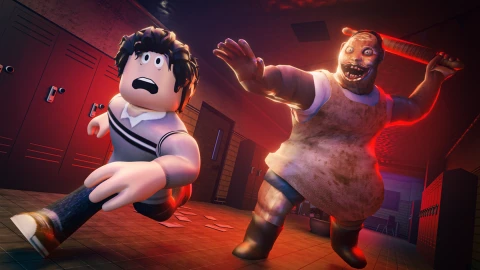
V4 Script is an Exam Week script for Roblox, uploaded to ScriptBlox on Apr 25, 2026.
Does it work?
No reports yetNo reports yet. Tried it? Be the first to say.
Also noticed:
Description
V4 Features: -Lady ESP -Answer Page ESP -Revive Kit ESP -Noclip -FullBright -TP to Answer Page Note:Before using TP to answer page make sure your Noclip is enabled
-- [[ EXAM WEEK SCRIPT: MAPSLOVER V4 ]] --
local LP = game:GetService("Players").LocalPlayer
local RS = game:GetService("RunService")
local UIS = game:GetService("UserInputService")
local Lighting = game:GetService("Lighting")

local pGui = LP:FindFirstChild("PlayerGui")
if pGui and pGui:FindFirstChild("MapsLoverScript") then pGui.MapsLoverScript:Destroy() end

local SG = Instance.new("ScreenGui", pGui); SG.Name = "MapsLoverScript"; SG.ResetOnSpawn = false

-- DRAG LOGIC
local function drag(gui)
    local dragging, input, start, startPos
    gui.InputBegan:Connect(function(i)
        if i.UserInputType == Enum.UserInputType.MouseButton1 or i.UserInputType == Enum.UserInputType.Touch then
            dragging = true; start = i.Position; startPos = gui.Position
        end
    end)
    UIS.InputChanged:Connect(function(i)
        if dragging and (i.UserInputType == Enum.UserInputType.MouseMovement or i.UserInputType == Enum.UserInputType.Touch) then
            local delta = i.Position - start
            gui.Position = UDim2.new(startPos.X.Scale, startPos.X.Offset + delta.X, startPos.Y.Scale, startPos.Y.Offset + delta.Y)
        end
    end)
    gui.InputEnded:Connect(function() dragging = false end)
end

-- MINIMIZE BUTTON
local M = Instance.new("TextButton", SG)
M.Size = UDim2.new(0, 60, 0, 60); M.Position = UDim2.new(0.1, 0, 0.1, 0)
M.BackgroundColor3 = Color3.fromRGB(20, 20, 20); M.Text = "M"; M.Visible = false
M.Font = Enum.Font.SourceSansBold; M.TextSize = 35; Instance.new("UICorner", M).CornerRadius = UDim.new(1, 0)
local MStroke = Instance.new("UIStroke", M); MStroke.Thickness = 4; drag(M)

-- MAIN FRAME
local F = Instance.new("Frame", SG)
F.Size = UDim2.new(0, 210, 0, 300); F.Position = UDim2.new(0.5, -105, 0.4, 0); F.BackgroundColor3 = Color3.fromRGB(20, 20, 25)
drag(F)
Comments
0Log in to join the conversation. Login
No comments yet. Be the first!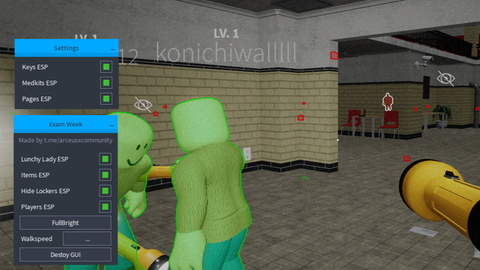

![[UPD] 8 Ball Duels](https://tr.rbxcdn.com/180DAY-0c5f1f4427b0eed903a9949ba2d52aa6/480/270/Image/Webp/noFilter)
![[🎃] Create a Robot Fighter](https://tr.rbxcdn.com/180DAY-a91e5b4855c6f666e9c74455d1c0b674/480/270/Image/Webp/noFilter)
![[🎃 HALLOWEEN ] Jujutsu Zero](/images/script/128451689942376-1793019107401.webp)
![[UPD🤑] +1 Money Per Click 💸](/images/script/79039639963203-1793305614606.png)