1.5k Views
722 Executions

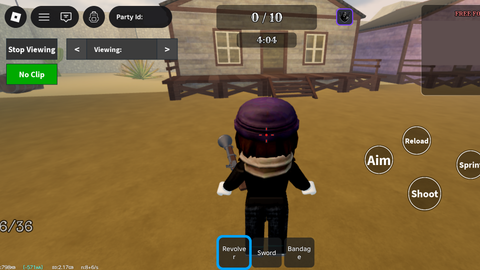
Free For All is a Dead Rails script for Roblox, uploaded to ScriptBlox on Apr 2, 2026.
Does it work?
No reports yetNo reports yet. Tried it? Be the first to say.
Also noticed:
Description
100% FREE AND DOESNT LAG YOUR DEVICE. I WANT YOU TO SCREW THIS MODE SO MUCH. ALSO THERE ARE FRIENDLY FIRE BUG ON ON NORMAL MAP SO FEEL FREE TO TROLL AS MUCH AS YOU WANT THEY ADDED THIS SHITASS MODE INSTEAD OF BRINGING BACK FOOLS GOLD MODE ON APRIL FOOL. CANT EVEN FIX THE DAMN BUGS YET HERE THEY ARE ADDING STUFF NOBODY WANTED. THIS SCRIPT WORKS BY LOCKING YOUR VIEW TO THE BACK OF PEOPLE, BUT FIRST USE THE NOCLIP AND RUN INSIDE THE WALL SO THEY CANNOT SEE AND KILL YOU.
local Players = game:GetService("Players")
local RunService = game:GetService("RunService")
local LocalPlayer = Players.LocalPlayer
local Camera = workspace.CurrentCamera

-- Create ScreenGui
local screenGui = Instance.new("ScreenGui")
screenGui.Name = "SpectateGui"
screenGui.ResetOnSpawn = false
screenGui.Parent = LocalPlayer:WaitForChild("PlayerGui")

-- Create View Button
local viewButton = Instance.new("TextButton")
viewButton.Name = "ViewButton"
viewButton.Size = UDim2.new(0, 100, 0, 40)
viewButton.Position = UDim2.new(0, 20, 0, 20)
viewButton.BackgroundColor3 = Color3.fromRGB(50, 50, 50)
viewButton.TextColor3 = Color3.new(1, 1, 1)
viewButton.Font = Enum.Font.SourceSansBold
viewButton.TextSize = 20
viewButton.Text = "View"
viewButton.Parent = screenGui

-- Create No Clip Button below View Button
local noclipButton = Instance.new("TextButton")
noclipButton.Name = "NoClipButton"
noclipButton.Size = UDim2.new(0, 100, 0, 40)
noclipButton.Position = UDim2.new(0, 20, 0, 70) -- 50 pixels below View button
noclipButton.BackgroundColor3 = Color3.fromRGB(50, 50, 50)
noclipButton.TextColor3 = Color3.new(1, 1, 1)
noclipButton.Font = Enum.Font.SourceSansBold
noclipButton.TextSize = 20
noclipButton.Text = "No Clip"
noclipButton.Parent = screenGui

-- Create Spectate Controls Frame (hidden initially)
local spectateControls = Instance.new("Frame")
spectateControls.Name = "SpectateControls"
spectateControls.Size = UDim2.new(0, 220, 0, 40)
spectateControls.Position = UDim2.new(0, 140, 0, 20)
Comments
0Log in to join the conversation. Login
No comments yet. Be the first!