Speed Script
Claw Fishing
Reviewed by QueueSherlockPaid revieweron How review works
Speed Script is a Claw Fishing script for Roblox, uploaded to ScriptBlox on Sep 27, 2026. Reviewed by a person on Sep 29, 2026.
Does it work?
No reports yetNo reports yet. Tried it? Be the first to say.
Description
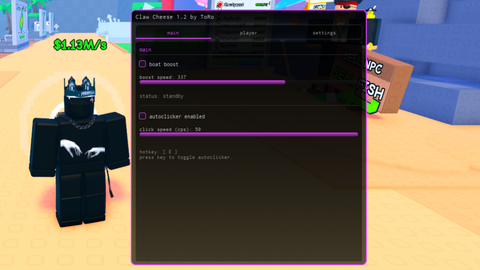
A performant, minimalist, and fully customizable Roblox script GUI by ToRo. ⚡ General Features & Functions 🚀 Vehicle & Boat Boost Speed Control: Adjustable velocity slider from 10 to 500 studs/s. Dual Activation: Use via hold keybind or toggle mode. Smart Detection: Automatically locates vehicle seats and root parts to apply directional velocity. Live Status Display: Shows real-time boost status (Active vs. Standby). 🖱️ Autoclicker CPS Adjustment: Customizable click speed from 1 to 50 CPS. Hotkey Toggle: Dedicated keybind to enable/disable instantly. Universal Compatibility: Uses mouse1click with fallback to VirtualInputManager. 🏃 Player & Performance Mods WalkSpeed & JumpPower Modifiers: Custom movement speed and jump height controls. Anti-AFK: Built-in protection against getting kicked for inactivity. Safe AFK Optimizer: Lowers rendering quality and freezes physics/particles to save performance while AFK. 🎨 Theme & Customization Redesigned Interface: Clean, modern tabbed layout with a draggable header bar. Custom Accent Colors: Real-time RGB sliders for custom highlight colors. Rainbow Mode: Dynamic HSV cycling for continuous rainbow effects. Background Customization: Independent RGB color, transparency, and darkness sliders. 💾 Config System (JSON Persistence) Auto Save/Load: Automatically generates and loads ClawCheeseConfig.json. Full Retention: Saves speeds, CPS, hotkeys, theme colors, background settings, and preferences across sessions. ⚙️ Utilities & QoL Rebindable Hotkeys: Easily change keys for Boost and Autoclicker inside the menu. FPS & Ping Overlay: Real-time performance monitor displayed directly on-screen. UI Scale Slider: Adjustable interface scaling from 50% to 150%. Hide UI Hotkey: Toggle interface visibility anytime using RightControl. Clean Unload: Safely terminates all loops, disconnects events, and destroys the GUI. 🔄 What's New in v1.2 UI Enhancement: Further beautified and polished interface elements for an even cleaner look. Tab Reorganization: Re-sorted tabs and moved the Autoclicker directly into the Main tab for better accessibility. Player Modifications: Added dedicated toggles and sliders for WalkSpeed and JumpPower. Performance Optimizer: Integrated a safe AFK optimizer mode to minimize resource usage. Advanced Visuals: Added FPS & Ping overlay, UI scaling, and comprehensive background darkness controls.
Updates
Script edited: Update script
Script edited: Update script
local Players, UserInputService, RunService, VirtualInputManager, HttpService, TweenService, VirtualUser, Stats =
	game:GetService("Players"), game:GetService("UserInputService"), game:GetService("RunService"), game:GetService("VirtualInputManager"), game:GetService("HttpService"), game:GetService("TweenService"), game:GetService("VirtualUser"), game:GetService("Stats")

local player, configFileName, accentColor = Players.LocalPlayer, "ClawCheeseConfig.json", Color3.fromRGB(75, 200, 155)
local bgDarkness, boostSpeed, isBoosting, boostToggled, boostKey = 0.45, 150, false, false, Enum.KeyCode.LeftShift
local autoClickerEnabled, autoClickCPS, autoClickKey = false, 15, Enum.KeyCode.E
local walkSpeedEnabled, walkSpeed, jumpPowerEnabled, jumpPower, antiAfkEnabled = false, 32, false, 100, true
local fpsOverlayEnabled, uiScaleValue, rainbowEnabled, afkRenderDisabled = true, 100, false, false
local bgR, bgG, bgB, bgTransparency = 24, 24, 24, 0

local function saveConfig()
	if writefile then pcall(function() writefile(configFileName, HttpService:JSONEncode({
		boostSpeed=boostSpeed, boostKey=boostKey.Name, autoClickCPS=autoClickCPS, autoClickKey=autoClickKey.Name,
		walkSpeedEnabled=walkSpeedEnabled, walkSpeed=walkSpeed, jumpPowerEnabled=jumpPowerEnabled, jumpPower=jumpPower,
		antiAfkEnabled=antiAfkEnabled, fpsOverlayEnabled=fpsOverlayEnabled, uiScaleValue=uiScaleValue,
		customR=accentColor.R*255, customG=accentColor.G*255, customB=accentColor.B*255, rainbowEnabled=rainbowEnabled,
		bgR=bgR, bgG=bgG, bgB=bgB, bgTransparency=bgTransparency, afkRenderDisabled=afkRenderDisabled, bgDarkness=bgDarkness
	})) end) end
end

if isfile and readfile and isfile(configFileName) then pcall(function()
	local d = HttpService:JSONDecode(readfile(configFileName))
	if d then
		boostSpeed, autoClickCPS, walkSpeed, jumpPower, uiScaleValue = d.boostSpeed or boostSpeed, d.autoClickCPS or autoClickCPS, d.walkSpeed or walkSpeed, d.jumpPower or jumpPower, d.uiScaleValue or uiScaleValue
		boostKey, autoClickKey = (d.boostKey and Enum.KeyCode[d.boostKey]) or boostKey, (d.autoClickKey and Enum.KeyCode[d.autoClickKey]) or autoClickKey
		walkSpeedEnabled, jumpPowerEnabled, antiAfkEnabled, fpsOverlayEnabled = d.walkSpeedEnabled ~= nil and d.walkSpeedEnabled, d.jumpPowerEnabled ~= nil and d.jumpPowerEnabled, d.antiAfkEnabled ~= nil and d.antiAfkEnabled, d.fpsOverlayEnabled ~= nil and d.fpsOverlayEnabled
		rainbowEnabled, afkRenderDisabled, bgTransparency, bgDarkness = d.rainbowEnabled ~= nil and d.rainbowEnabled, d.afkRenderDisabled ~= nil and d.afkRenderDisabled, d.bgTransparency or bgTransparency, d.bgDarkness or bgDarkness
		if d.customR then accentColor = Color3.fromRGB(d.customR, d.customG, d.customB) end
		if d.bgR then bgR, bgG, bgB = d.bgR, d.bgG, d.bgB end
	end
end) end

local function mk(cls, props, parent)
	local obj = Instance.new(cls)
	for k, v in pairs(props) do obj[k] = v end
	if parent then obj.Parent = parent end
	return obj
end

-- Cooler Fade / Transparenz-Verlauf für den edlen Look bei Dark & Transparent