102 Views
899 Executions
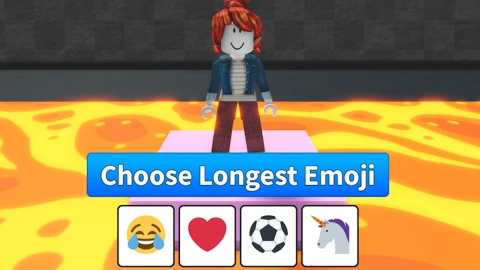
Auto answer and see longest emoji
Choose Longest Emoji
plozzirr34First script
3 months ago
Please login to perform these actions:Auto answer and see longest emoji is a Choose Longest Emoji script for Roblox, uploaded to ScriptBlox on Aug 10, 2026.
Does it work?
No reports yetNo reports yet. Tried it? Be the first to say.
Also noticed:
Description
See the longest emoji and auto answer (adjustable) Script is AI
local Players = game:GetService("Players")
local CoreGui = game:GetService("CoreGui")
local HttpService = game:GetService("HttpService")
local VirtualInputManager = game:GetService("VirtualInputManager")
local LocalPlayer = Players.LocalPlayer

-- Target text label path
local PlayerGui = LocalPlayer:WaitForChild("PlayerGui")
local GameGui = PlayerGui:WaitForChild("GameGui", 5)
local TopFrame = GameGui and GameGui:WaitForChild("TopFrame", 5)
local LeftLabel = TopFrame and TopFrame:WaitForChild("LeftLabel", 5)

if not LeftLabel then
    warn("LeftLabel not found at Path: PlayerGui.GameGui.TopFrame.LeftLabel")
    return
end

-- Re-run cleanup
if CoreGui:FindFirstChild("EmojiTrackerGui") then
    CoreGui.EmojiTrackerGui:Destroy()
end

-- State variables
local autoAnswerEnabled = false
local autoDelay = 0.2
local EMOJI_DB = {}
local lastAnsweredText = ""
local isSubmitting = false

-- Compact UI Setup
local screenGui = Instance.new("ScreenGui")
screenGui.Name = "EmojiTrackerGui"
screenGui.ResetOnSpawn = false
screenGui.Parent = CoreGui

local mainFrame = Instance.new("Frame")
mainFrame.Size = UDim2.new(0, 250, 0, 162)
mainFrame.Position = UDim2.new(0.5, -125, 0.2, 0)
mainFrame.BackgroundColor3 = Color3.fromRGB(25, 25, 35)
mainFrame.BorderSizePixel = 0
Comments
0Log in to join the conversation. Login
No comments yet. Be the first!