2.9k Views
24 Executions
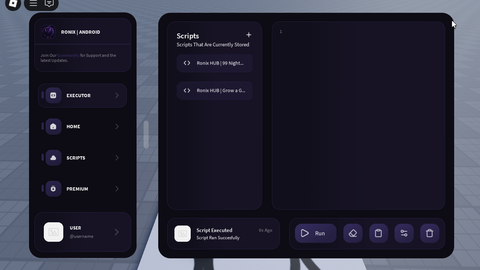
Ronix Android New UI
Baseplate
DavidRemisonFirst script
1 year ago
Please login to perform these actions:Ronix Android New UI is a Baseplate script for Roblox, uploaded to ScriptBlox on Sep 21, 2025.
Does it work?
No reports yetNo reports yet. Tried it? Be the first to say.
Also noticed:
Description
Execute and clear its not working You can modify it to make it work
--[=[
 d888b  db    db d888888b      .d888b.      db      db    db  .d8b.
88' Y8b 88    88   `88'        VP  `8D      88      88    88 d8' `8b
88      88    88    88            odD'      88      88    88 88ooo88
88  ooo 88    88    88          .88'        88      88    88 88~~~88
88. ~8~ 88b  d88   .88.        j88.         88booo. 88b  d88 88   88    @uniquadev
 Y888P  ~Y8888P' Y888888P      888888D      Y88888P ~Y8888P' YP   YP  CONVERTER
]=]

-- Instances: 475 | Scripts: 23 | Modules: 0 | Tags: 0
local G2L = {};

-- StarterGui.! | RONIX Modified
G2L["1"] = Instance.new("ScreenGui", game:GetService("Players").LocalPlayer:WaitForChild("PlayerGui"));
G2L["1"]["IgnoreGuiInset"] = true;
G2L["1"]["ScreenInsets"] = Enum.ScreenInsets.None;
G2L["1"]["Name"] = [[! | RONIX Modified]];
G2L["1"]["ZIndexBehavior"] = Enum.ZIndexBehavior.Sibling;
G2L["1"]["ResetOnSpawn"] = false;


-- StarterGui.! | RONIX Modified.! | Anchor
G2L["2"] = Instance.new("Frame", G2L["1"]);
G2L["2"]["BorderSizePixel"] = 0;
G2L["2"]["BackgroundColor3"] = Color3.fromRGB(255, 255, 255);
G2L["2"]["AnchorPoint"] = Vector2.new(0.5, 0.5);
G2L["2"]["Size"] = UDim2.new(1, 0, 1, 0);
G2L["2"]["Position"] = UDim2.new(0.5, 0, 0.5, 0);
G2L["2"]["BorderColor3"] = Color3.fromRGB(0, 0, 0);
G2L["2"]["Name"] = [[! | Anchor]];
G2L["2"]["BackgroundTransparency"] = 1;


-- StarterGui.! | RONIX Modified.! | Anchor.UIAspectRatioConstraint
G2L["3"] = Instance.new("UIAspectRatioConstraint", G2L["2"]);
G2L["3"]["AspectRatio"] = 1.62014;


-- StarterGui.! | RONIX Modified.! | Anchor.Bar
G2L["4"] = Instance.new("ImageLabel", G2L["2"]);


I'm going to take it and change it, is it possible?
playergui...
very nice gui
nothing happend
doesnt work on krnl it doesnt load