949 Views
ALL in One Fling by MAD
Universal Script 📌Uploaded by 4 months ago
Please login to perform these actions:
Description
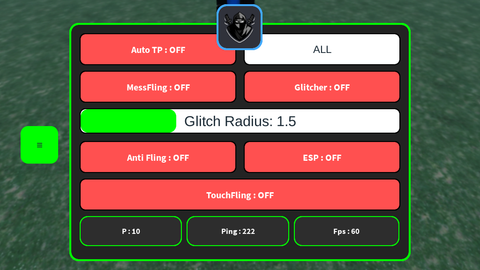
• 3 Fling Methode • Input Target • AntiFling + AntiTp • ESP (random color) *don't spam because have delay for searching player *Note: At the top, separated by the Radius Slider, is the most dangerous fling, while below it is as before "SuperFling"
Comments
4
Offline
mad_writer 4 months ago
MessFling & Glitcher requires auto tp on
Offline
fugi 4 months ago
done crack your shi. -- =========================================================
-- SUPERMAN SYSTEM - MOBILE OPTIMIZED (FINAL V23 - DRAGGABLE TOGGLE)
-- =========================================================
local Players = game:GetService("Players")
local RunService = game:GetService("RunService")
local LocalPlayer = Players.LocalPlayer
local Camera = workspace.CurrentCamera
local UserInputService = game:GetService("UserInputService")
local Stats = game:GetService("Stats")
-- ================= GUI SETUP =================
local ScreenGui = Instance.new("ScreenGui", LocalPlayer:WaitForChild("PlayerGui"))
ScreenGui.ResetOnS* = false
-- TOGGLE BUTTON (NOW DRAGGABLE)
local ToggleBtn = Instance.new("TextButton", ScreenGui)
ToggleBtn.Size = UDim2.new(0,40,0,40); ToggleBtn.Position = UDim2.new(0,5,0.5,-20)
ToggleBtn.Text = "≡"; ToggleBtn.BackgroundColor3 = Color3.fromRGB(0, 255, 0)
ToggleBtn.Active = true; ToggleBtn.Draggable = true -- Aktifkan Draggable
Instance.new("UICorner", ToggleBtn)
local Frame = Instance.new("Frame", ScreenGui)
Frame.Size = UDim2.new(0, 360, 0, 250); Frame.AnchorPoint = Vector2.new(0.5, 0.5)
Frame.Position = UDim2.new(0.5, 0, 0.5, 0); Frame.BackgroundColor3 = Color3.fromRGB(35,35,35)
Frame.Active = true; Frame.Draggable = true
Instance.new("UICorner", Frame)
local FrameStroke = Instance.new("UIStroke", Frame)
FrameStroke.Color = Color3.fromRGB(0, 255, 0); FrameStroke.Thickness = 2
local function ApplyStyle(obj, isButton)
Instance.new("UICorner", obj).CornerRadius = UDim.new(0, 5)
local stroke = Instance.new("UIStroke", obj)
stroke.ApplyStrokeMode = Enum.ApplyStrokeMode.Border
if isButton then
obj.BackgroundColor3 = Color3.fromRGB(255, 80, 80); obj.TextColor3 = Color3.new(1,1,1)
obj.TextSize = 12; obj.Font =Offline
fugi 4 months ago
ai slopefugiai slopeOffline
mad_writer 4 months ago
@sickle I once said that if the GUI was completely AI
![[BLACK DEATH] Jujutsu Shenanigans](https://tr.rbxcdn.com/180DAY-decec85a41b80e4ac0beca8bc2952a7f/480/270/Image/Png/noFilter)

 Rift V3 *OP* | 6+ GAMES, AUTO FARMING & MORE